Hell got loose on k8s DinD

Friday, November 23, 2018

At Dawn

Nice and warm morning. Everything is going as planned. Birds singing and all. Suddenly a ci/cd pipeline hung. We had to kill it!!

John Martin Public domain or Public domain

Logs look weird.

Cannot contact jenkins-slave-6t97t: java.lang.InterruptedException
wrapper script does not seem to be touching the log file in /home/jenkins/workspace/some/fake/location@tmp/durable-9eef23f3
(JENKINS-48300: if on a laggy filesystem, consider -Dorg.jenkinsci.plugins.durabletask.BourneShellScript.HEARTBEAT_CHECK_INTERVAL=300)

Manually re-started it…same. Then another, different, unrelated project…Something is really broken.

Then is the Jenkins master: 503. The reverse proxy cannot reach it. It just died. Few seconds later is back alive. Start up takes it ages. Went to my terminal, these logs are clear.

> kubectl describe pod/jenkins-666xxxxxxx-666xx -n jenkins
# Summary
Status:         Failed
Reason:         Evicted
Message:        The node was low on resource: nodefs.

We ran out of disk space. Monitoring and alerts were set up in dev and prod, not in the ci/cd cluster.

So, what happened? It took me a while to move myself around the cluster. That pod had been running for 113 days without a single issue. Then, out of the blue: Evicted!!

Lets see what Kubernetes knows.

> kubectl describe nodes
# Too much info

Lot’s of warnings uh…Summary: GC is not able to delete some images because they are being used in stopped containers. A Quick look:

> kubectl get pods --all-namespaces
NAMESPACE 	NAME 			STATUS 	AGE
ingress 	default-http... Running 115d
ingress 	nginx-ingres... Running 94d
jenkins 	jenkins-6486... Evicted 115d
jenkins		jenkins-6486... Running 1d
jenkins 	jenkins-slav... Error 	1d
kube-system heapster-786... Running 27d
# Some other results

There are non stopped pods. What!?

Moment of darkness…Then the light bulb!! Stopped containers are not from k8s. They are straight from docker. Our Jenkins is spinning up a DinD (Docker in Docker) pod as build agent so developers can run their builds inside containers. This way no custom tool needs to be installed or updated when someone gets a new idea or a new framework comes out to the market…or something.

Line up the usual suspects

A DinD pipeline file might look like this:

stage('build') {
	sh(script: """
		docker build . \\
			--filename pipelines/Build.Dockerfile \\
			--tag base:$BUILD_NUMBER
	""")
}

The real magic will be inside that docker file, for instance:

FROM node:8-alpine

WORKDIR /src

COPY ./package.json ./
COPY ./yarn.lock ./
RUN yarn install 

COPY . .
RUN yarn run build

All pipelines have several test stages. They look like this:

stage('test') {
	sh(script: """
		docker run \\
			--rm \\
			base:$BUILD_NUMBER \\
			ash -c pipelines/test.sh
	""")
}

Did you notice the --rm? That’s it!! Some pipelines do not include this flag. Which means, when the test round is done, the container will stick around until manually deleted. Kubernetes does not know anything about this container, it is not represented in the cluster state. Perhaps there are some low level tools to detect it. I haven’t been able to find them.

Fix it!!

You cannot just knock at the cluster’s front door. Specially in aks. The nodes are not really accessible from the outside. You need to set up ssh keys with azure cli then create a pod…etc. Simpler solution: I have some test pipelines in place, the DinD agent has access to “outer” docker already.

Setup:

stage('sample') {
	sh(script: """
		sleep 5h
	""")
}

Manually run this pipeline and you would get a DinD pod for 5h. Just get into that pod and voilĂ …we are in business.

> kubectl exec jenkins-slave-666xx -n jenkins bash

First thing first, evaluate the damage.

> df
Filesystem  	Use% 	Mounted on
/dev/something	88%		/

Only 88% usage!? thought it would have been worst. In any case bad enough.

Check the list of containers:

> docker ps -a
CONTAINER ID        STATUS                  
3f000cecf70d        Exited (0) 5 days ago
94beaf1d791b        Exited (0) 2 months ago
# Many many many removed lines
d0984fc5a35e        Exited (0) 2 aeons ago

Lots and lots and lots of stopped containers, some pretty old.

If I try deleting all containers, all non stopped containers will remain unless -f is specified:

> for c in $(docker ps -qa); do docker rm $c; done

Couple of seconds later no more stopped containers. Time for the images:

> docker image prune

This one took a lil longer. Sanity check:

> df
Filesystem  	Use% 	Mounted on
/dev/something	41%		/

Repeated the process and luckily enough hit the second node. Cleaned it. Done it again but ran out of luck. Tried a couple more times, never got to the third node.

Went thru ssh pain. This command was useful for finding the IP to ssh to:

> kubectl get nodes -o custom-columns='Name:.metadata.name,Ip:.status.addresses[0].address'
Name				Ip
aks-nodepool1-xxx1	10.0.0.1
aks-nodepool1-xxx2	10.0.0.2
aks-nodepool1-xxx3	10.0.0.3

Ssh-ing those IPs got to the actual hosts. The remaining hurt one was not the first, obviously. Once there commands run lil faster and you must sudo your way thru. Everything else, the same:

> for c in $(sudo docker ps -qa); do sudo docker rm $c; done

Lessons learned

Always, always put monitoring and alerts in something you depend on. Always! This cluster might not seem that important, at least not as much as prod. But it is, you see: If it falls down, we cannot do any release, or lets say the release process becomes so much more complicated and error prone.

All docker run from all pipelines must include the --rm flag. Perhaps we can this automatically.

Scaling down to 1 and up to 3 again would have cleaned up n-1 nodes. Something to try next time.

We need some schedule cleanup tasks. We are not using Kubernetes in its purest form so we cannot expect it to deal with problems generated outside of its realm.

QC your whale

Thursday, November 8, 2018

Motivation

It is service world and there are several replicas of the same code executing in several hosts. There might be production errors that seem like a deploy might have not gone thru in some of them. When this happens, someone needs to manually check the file versions in all hosts. This might be simple when there 2 or 3, but there might be a lot more. This sounds like a task for a computer.
whale
Now, with continuous integration and delivery I see a way we can reduce the probability of inconsistencies and detect them way before they become a problem so we can raise all necessary alarms.

TL;DR

  1. Using your CI build tool inject the build number into the Dockerfile and make visible to the application via environment variable.
  2. Build a service endpoint returning that environment variable.
  3. Deploy to a staging environment.
  4. Validate the build number on staging environment
  5. Deploy to prod.
  6. Validate the build number on prod.

My toys

Long story

I will show you how I solved this problem and now they are part of the standard issue for all of my microservices.

The image…and likeness

Lets say you build your image

FROM microsoft/dotnet

ARG BUILD_NUMBER

# Dotnet build steps

# Next line is the magic step
ENV Meta__BuildNumber ${BUILD_NUMBER}

ENTRYPOINT ["dotnet", "Service.dll"]

The environment variable naming convention is dotnet core configuration’s way. With this magic step we convert the build argument into an environment variable that will be available in execution.

Jenkins: The build

~~stage('build') {
	sh(script: """
		docker build . \\
			--file pipelines/Build.Dockerfile \\
			--build-arg BUILD_NUMBER=$BUILD_NUMBER
	""")
}~~

Here we pass the argument from the build tool to Docker.

The Service…and longer part

Make sure environment variables are added to your configuration.

	configurationBuider
		.SetBasePath(env.ContentRootPath)
		.AddJsonFile("appsettings.json")
		.AddJsonFile($"appsettings.{env.EnvironmentName}.json")
		.AddEnvironmentVariables()
		.AddCommandLine(args)

Build a Meta (or any other name) class. An instance of this class will hold the actual value.

public class Meta 
{
	public int BuildNumber { get; set; }
}

Wire it up to dependency injection.

	services
		.Configure<Meta>(configuration.GetSection("Meta"))
		.AddTransient(r => r.GetRequiredService<IOptions<Meta>>().Value);

Create the service endpoint.

[Route("diagnostics")]
public class DiagnosticsController: Controller 
{
	private readonly Meta meta;
	
	public DiagnosticsController(Meta meta) 
	{
		this.meta = meta;
	}

	public IActionResult Get() 
	{
		return Ok(meta);
	}
}

I wanna see it dad!!

|--> curl staging.mycompany.com/diagnostics
{ 
	buildNumber: 209 
}

The Validator

Build an integration test accessing the endpoint

public class Integration 
{
	private readonly IConfiguration configuration;
	private readonly string serviceUrl;
	private readonly int expectedBuildNumber;
	private readonly HttpClient http;
	
	public Integration() 
	{
		var currentDirectory = Directory,GetCurrentDirectory();
		configuration = new ConfigurationBuilder()
			.SetBasePath(currentDirectory)
			.AddJsonFile("appsettings.json")
			.AddEnvironmentVariables()
			.Build();
			
		serviceUrl = configuration.GetValue<string>("Service:Url");
		expectedBuildNumber = configuration.GetValue<int>("Meta:BuildNumber");
		http = new HttpClient();
	}

	[Fact]
	[Trait("Category", "Integration")]
	public async Task Service_build_number_is_correct()
	{
		var response = await http.GetAsync($"{serviceUrl}/diagnostics");
		response.EnsureSuccessStatusCode();
		var meta = response.Content.FromJsonBytes<Meta>();

		Assert.Equal(expectedBuildNumber, meta.BuildNumber);
	}
}

This test requires 2 configuration values, Service:Url and Meta:BuildNumber. Both must be available when running the tests.

Deploy to staging

At some point the pipeline will deploy to a staging environment. Just sit tight and wait for it to finish. Give it some room just in case application data loading or rolling updates are needed.

Jenkins II: The validation

Let’s suppose we have build an image for running tests and tagged it Tests:$BUILD_NUMBER. With that image we can execute the validation. Time for the shit. Run the funky tests wild boy.

stage('validate staging') {
	sh(script: """
		docker run \\
			--env Service__Url=http://staging.mycompany.com \\
			--env Meta__BuildNumber=$BUILD_NUMBER \\
			Tests:$BUILD_NUMBER \\
			dotnet test --filter=Category~Integration
	""")
}

At this point, if this step comes out green, you are very likely to deploy to production without any issue. If it fails you might have broken staging, but not production. You are still save. With the build logs together with your environment ones you are very likely to find the issue, solve and start the pipeline straight from the top.

The only truth

If you have a good staging environment, one that is almost identical to prod, the only acceptable differences are sizes and identities, your chances of getting a successful deployment is extremely high.

In case the validation fails: man, you are in trouble. You might have broken prod, fixing it must be the highest prio. At least, with this validation you will be able to tell immediately. Make sure you find the root cause of the problem. Don’t just fix. Gather all logs, reproduce the issue, automate it.

In the end, the only thing that matters is prod. It’s what pays for the party.

Git the Ssh

Sunday, October 28, 2018

Motiv

I Hate some VCS tools: Specially Bart and Specially Source Tree. Having to input the username and password from time to time really bothers me. No matter how many times I have configured it in different PCs and OSes it eventually ends up asking for username and password…for some repos, or some operations.

So I got tired. I will use ssh with key pairs as I’ve been doing for ssh-ing to remote servers for many years now. Have a look at RSA too.

Another lil thing. Passwords are insecure by nature. Renewing passwords automatically would be hard if possible at all. Key pairs are very secure and can be automatically renewed with ease.

Since I am doing this on both Windows and Linux I will explain both. Windows has more steps as ssh is not very OS native.

Let’s crack on

Install openssh (windows only):

My favorite way for installing things in Windows is chocolatey. But any other should work as well.

choco install openssh -y

In my case I needed to manually execute the following script.

"$env:ProgramFiles/OpenSSH-Win64/install-sshd.ps1"

A friend of mine needed to manually start the service: go to windows services and start “OpenSSH Authentication Agent”.

Execute the agent from the console

The ssh agent takes care of serving keys to other softwares. For ssh to work with keys the agent must be running.

ssh-agent

Add startup (optional)

Get your self some keys

Let’s say you have two accounts: one personal, one corporate. Each will require its own.

Preferred method

Run ssh-keygen and follow prompts. You can find lil more here

Alternative

This one might be simpler. But be careful, you need additional steps as default file format is not good. here

Copy the keys to a folder

My favorite place would be ~/.ssh as it has special meaning for some ssh operations. The folder might look like:

~/.ssh
	personal
	corporate
	personal.pub
	corporate.pub

The files without the extensions are the private keys, the others are the public ones.

Restrict file access

Remove permission to all users but yourself. You might need to restart the PC for it to work.

  • For Windows use Properties > Security
  • For Linux chmod 500 <keyfile>

Add the keys to the agent

ssh-add ~/.ssh/personal
ssh-add ~/.ssh/corporate

Add public keys to VCS web

Bitbucket

https://confluence.atlassian.com/bitbucketserver/ssh-access-keys-for-system-use-776639781.html

Github

https://help.github.com/articles/connecting-to-github-with-ssh/

Add an ssh config file

Create a text file ~/.ssh/config. Make sure file has no BOM , I have tried with UTF-8 and Unix style (LF) line endings. This file tells ssh which key to use which each host, you can create aliases. Each entry should look like this:

# An entry
Host alias
	HostName host.com
	User git
	IdentityFile ~/.ssh/private-key-file

An entire file looks something like:

# Default - Personal
Host bitbucket.org
	HostName bitbucket.org
	User git
	IdentityFile ~/.ssh/personal

# Personal
Host personal
	HostName bitbucket.org
	User git
	IdentityFile ~/.ssh/personal

# Corporate
Host corporate
	HostName bitbucket.org
	User git
	IdentityFile ~/.ssh/corporate

Host github
	HostName github.com
	User git
	IdentityFile ~/.ssh/personal

Host github.com
	HostName github.com
	User git
	IdentityFile ~/.ssh/personal

Test:

ssh -T bibucket.org
ssh -T personal
ssh -T corporate

Clone a git repo:

git clone git@personal:project/repo
git clone git@corporate:project/repo

Clone a hg repo:

hg clone ssh://hg@bitbucket.org/project/repo

Bonus

Once you have an entry in you ssh config you can do any ssh operation with that host/credentials:

Remotely connect to a host

ssh your_user@somealias

Ssh copy file

scp your_user@somealias:~/source.txt destination/

Outro

Manually typing user name and passwords has become old fashioned. It is time consuming and insecure. In order for us to do things right we need simpler ways for doing so.

SSH has been around for more than 20 years. All this time proving itself as a hell of a good and simple tool with a very good record (few vulnerabilities).

Think it is 'bout time we embrace it.

References

https://tiffanybbrown.com/2017/06/using-multiple-ssh-keys-with-github/index.html
https://help.github.com/articles/testing-your-ssh-connection/

Composition over inheritance

Wednesday, September 14, 2016

I’ve heard this phrase a lot. Said it a couple of times too. Most of the discussions about that subject: I’ve lost. I’ll keep trying though. Let’s compose, shall we.

I had a problem and decided to attack with Command Query Responsibility Separation (CQRS) and Event sourcing. Because CQRS is simpler than pure DDD and we can still use many of the great advantages of DDD for dealing with complex business logic…And I think it’s quite simple once you get the grip of it.

My over-engineered solution

Yes!!! I know: I should never, but instead of fighting the bull for real straight from the beginning, I prefer rehearsing, as much as possible, before going out to the arena.

enter image description here

My command stack contains one method per write operation. Each is very very simple, the actual business logic is implemented in entities (POCOs). Every persistence call is asynchronous.

class ProductCommands {
    private readonly IWriter<Product> writer;
    private readonly Func<CreateProductCommand, Product> createProduct;

    public ProductCommands(IWriter<Product> writer, 
        Func<ProductCreatedCommand, Product> createProduct) {
        this.writer = writer;
        this.createProduct = createProduct;
    }

    public async Task Handle(CreateProductCommand cmd) {
        var product = createProduct(cmd);

        await writer.Save(product);
    }
}

Simple, right? Product are aggregate roots that hold an internal list of modification events. These events are the key for Event sourcing. There are many implementations (look here, here and here):

abstract class AggregateRoot {
    private readonly List<DomainEventBase> uncommittedEvents = 
        new List<DomainEventBase>();
    public IEnumerable<DomainEventBase> UncommittedEvents => 
        uncommittedEvents.AsReadOnly();

    public void ClearUncommittedEvents() {
        uncommittedEvents.Clear();
    }
    //...
}

The aggregates keep events for all changes they have suffered until the events are committed and cleared.

Composition Root

At some point in my application there should be a place where all the instances are created. There, we will do something like:

var productCommands = new ProductCommands(
    NewProductWriter(),
    ProductFactory.Create);

From this point forward we’ll just need to change the way we create writer instances and the whole application will change it’s behavior.

private IWriter<Product> NewProductWriter() => 
    new DocumentStoreWriter<Product>();

For the time being let’s say we have this magical DocumentStoreWriter<T> that takes care of my persistence.

Dealing with events

Every time I save a product, I must also save it’s uncommitted events. This will be my first piece, a Decorator.

enter image description here

In real life this process will be asynchronous. The flow though is not very different.

class WriterEventCommittingDecorator<TEntity>: IWriter<TEntity> {
    private readonly IWriter<TEntity> inner;
    private readonly IEventStorage eventStorage;

    public WriterEventCommittingDecorator(
        IWriter<TEntity> inner, 
        IEventStorage eventStorage) {
        this.inner = inner;
        this.eventStorage = eventStorage;
    }

    public async Task Save(IEnumerable<TEntity> entities) {
        var eagerlyIteratedEntities = entities.ToList();

        var committingTasks = eagerlyIteratedEntities
            .Select(async t => {
                await eventStorage.Save(t.UncommittedEvents);
                t.ClearUncommittedEvents();
            });
        await Task.WhenAll(committingTasks);

        await inner.Save(eagerlyIteratedEntities);
    }
}

My new writer is:

private IWriter<Product> NewProductWriter() => 
    new WriterEventCommittingDecorator<Product>(
        new DocumentStoreWriter<Product>(/*...*/),
        new StandardEventStorage(/*...*/)
    );

Query Dbs

I don’t want (for this particular case) eventual consistency for my query databases, I prefer saving to all of them at once.

enter image description here

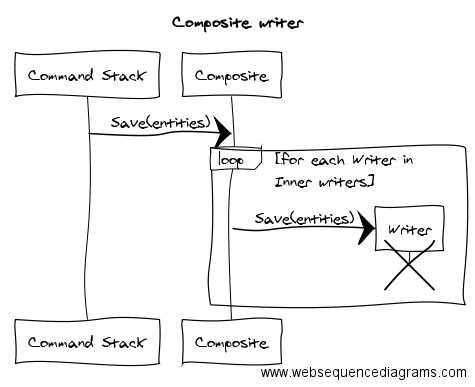
Programming this on the ProductCommands will be too cumbersome, not to mention it will not be an extensible solution, and we are very liklely to change the databases very often. This is work for a Composite.

enter image description here

Again, it will be asynchronous.

class CompositeWriter<TEntity>: IWriter<TEntity> {
    private readonly List<IWriter<TEntity>> innerWriters;

    public CompositeWriter(IEnumerable<TEntity> innerWriters) {
        this.innerWriters = innerWriters.ToList();
    }

    public Task Save(IEnumerable<TEntity> entities) {
        var innerSavingTasks = innerWriters.Select(t => t.Save(entities));

        return Task.WhenAll(innerSavingTasks);
    } 
}

My new writer is:

private IWriter<Product> NewProductWriter() => 
    new WriterEventCommittingDecorator<Product>(
        new CompositeWriter<Product>(
            new InitialStateWriter<Product>(/*...*/),
            new CurrentStateWriter<Product>(/*...*/),
            new ProductSearchDbWriter(/*...*/),
            new ProductReportsDbWriter(/*...*/)
        ),
        new StandardEventStorage(/*...*/)
    );

I have also replaced the magic DocumentStoreWriter<T> by the actual writers that will take care of the job.

I am getting close…

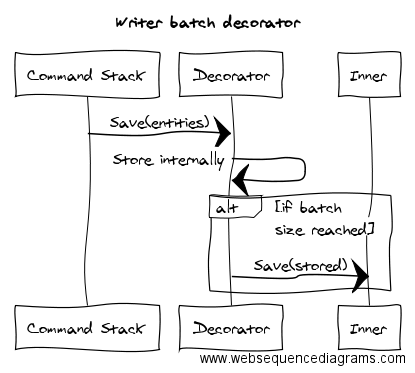
One of my use cases is a standalone import that will take lots (hundreds of thousands) of products and save them all, one time each. It’s a batch text book use case. Another decorator will do the trick.

enter image description here

Once more…asynchronous. I will use TPL’s Dataflow for building this one.

class WriterBatchDecorator<TEntity>: IWriter<TEntity> {
    private readonly IWriter<TEntity> inner;
    private readonly BatchBlock<TEntity> batch;

    public WriterBatchDecorator(IWriter<TEntity> inner, int batchSize = 100) {
        this.inner = inner;

        batch = CreateBatchBlock(batchSize);
    }

    private static BatchBlock<TEntity> CreateBatchBlock(int size) {
        var save = new ActionBlock<TEntity[]>(
            entities => inner.Save(entities));

        var batch = new BatchBlock<TEntity>(batchSize);
        batch.LinkTo(save);

        return batch;
    }

    public Task Save(IEnumerable<TEntity> entities) {
        var saveTasks = entities
            .Select(e => batch.SendAsync(e));

        return Task.WhenAll(saveTasks);
    }
}

My new writer is:

private IWriter<Product> NewProductWriter() => 
    new WriterEventCommittingDecorator<Product>(
        new WriterBatchDecorator<Product>(
            new CompositeWriter<Product>(
                new InitialStateWriter<Product>(/*...*/),
                new CurrentStateWriter<Product>(/*...*/),
                new ProductSearchDbWriter(/*...*/),
                new ProductReportsDbWriter(/*...*/)
            ),
            BatchSize
        ),
        new StandardEventStorage(/*...*/)
    );

I have put the batch inside the event committing decorator because I want the events to be committed as soon as possible. I could use a similar decorator for the event storage. For the actual user interactive solution we might just leave outside the batch, which is just having a different composition root there.

Next thing could be adding some explanatory variables to avoid dizziness.

private IWriter<Product> NewProductWriter() {
    var composite = new CompositeWriter<Product>(
        new InitialStateWriter<Product>(/*...*/),
        new CurrentStateWriter<Product>(/*...*/),
        new ProductSearchDbWriter(/*...*/),
        new ProductReportsDbWriter(/*...*/)
    );

    var batch = new WriterBatchDecorator<Product>(
        composite,
        BatchSize
    );

    var eventStorage = new StandardEventStorage(/*...*/);
    var eventCommitting = new WriterEventCommittingDecorator<Product>(
        batch,
        eventStorage
    );

    return eventCommitting;
}

Now I have all the things the user needs. Let’s put another one, one for us programmers: Logs. By now you might guess, it will be yet another decorator:

class WriterLoggingDecorator<TEntity>: IWriter<TEntity> {
    private readonly IWriter<TEntity> inner;
    private readonly ILogger logger;

    public WriterLoggingDecorator(
        IWriter<TEntity> inner,
        ILogger logger) {
        this.inner = inner;
        this.logger = logger;
    }

    public async Task Save(IEnumerable<TEntity> entities) {
        var eagerlyIteratedEntities = entities.ToList();

        var count = eagerlyIteratedEntities.Count;
        logger.Trace($"{typeof(TEntity)} writing {count}");

        try {
            logger.Trace("Begining actual save");

            inner.Save(eagerlyIteratedEntities);

            logger.Trace("Done with actual save");
        } catch (Exception ex) {
            logger.Error(ex);
        }
    }
}

Activating the logger will be as simple as including it in the composition root.

    // ...
    var composite = new CompositeWriter<Product>(
        new InitialStateWriter<Product>(/*...*/),
        new CurrentStateWriter<Product>(/*...*/),
        new ProductSearchDbWriter(/*...*/),
        new ProductReportsDbWriter(/*...*/)
    );

    var logging = new WriterLogDecorator(
        composite, 
        logger);

    var batch = new WriterBatchDecorator<Product>(
        logging,
        BatchSize
    );

The logger has been placed inside the batch, so entities getting into the batch will not be logged, instead, only those getting out of it. Different setups can serve different purposes. We might want several loggers around, in many places.

Outro

With a set of very small components it was easy to compose an application with desired behavior. Each component has a very simple and well defined responsibility. Once in place the whole application can be tweeked to improved performance and traceability. It’s simpler to tweek just one place than many (shotgun surgery). That one place is the composition root. Many new behaviors can be implemented in form of reusable decorators.

Now…let’s mentally imagine how would that look with inheritance.

Feature branching and CI

Thursday, October 29, 2015

This is me….being run over by a branching strategy.

In some projects I work, we kinda of follow git flow. It is awesome! The problem is that some how the branches have become a technique to control what get’s released (kind of feature toggles). It means that when features are ready, their branches are put on hold until we decide we can release them.

Feature Branching is a poor man’s modular architecture, instead of building systems with the ability to easy swap in and out features at runtime/deploytime they couple themselves to the source control providing this mechanism through manual merging.

Dan Bodart

An example

Taken from Martin Fowler. Here.

Let’s say we have feature branches. So Reverend Green and Professor Plum start working on their branches, G and P receptively. In the center there is the Develop branch D, where the branches are merged to when ready. At some point Reverend Green’s branch is merged creating commit D4. Now Professor Plum’s branch is out of date and must be synchronized by merging in from develop, this creates commit P5.

enter image description here

What’s the big deal? The biggest this P5 merge is the more likely Professor Plum’s branch end up being completely useless. The problem comes for semantic changes in the code: A method that no longer does what it did before, a class that has been removed, some refactoring (methods extracted, arguments added/removed) and so on. The code might even compile, but the purpose of the branch will be lost.

Merge paranoia

Long living feature branches take you to a point where most merges are dangerous. Some times because they are too big. Others because the branches that are supposed to be released are way too out of date.

All this avoiding the merge thing is called merge paranoia. It’s a recognized condition caused by code base in Software Peter early stages. It means that the technical debt has become so big that any tiny little change could bring the whole thing down.

This is a problem, but source control cannot do absolutely nothing about it.

Lost work.

I took some repository, created a PowerShell script and got open branches’ difference with develop, first and last commit dates, date spams: from last commit, between first and last. The numbers were alarming.

Just a brief:

Branch Files Changed Today()-LastCommit.Date LastCommit.Date-FirstCommit.Date
B01 1435 665 3
B02 1389 665 0
B31 302 133 160
B37 207 101 77
B38 47 80 0
B39 30 65 7
B40 8 58 0
B41 8 58 0
B42 7 57 0
B43 1 56 0
B44 1 56 0

There are 44 branches, the ones missing have been hidden to abbreviate. The youngest branch has almost 2 month old, the older: almost 2 years. Most people don’t remember what they have done after a couple of weeks. Time span between first and last commits is as big as 5 months. I could safely affirm: from B01 to B39 there is absolutely nothing to do, they are lost….forever. This repository has had 257 branches. That means 15.2% of all the work done here.

Imagine your boss saying – Didn’t we solved this problem months ago? – Yeah….but we never released. – Ok, let’s release it now. – Uh…here is the thing.

So…what do we do?

Time came: fresh blood and a brand new project. Let’s try the thing as it was defined!! For real!! It turned out: It works!!

We have user stories broken down into tasks. Each task must take less than a day, or it should be broken down into more. For each task we create a new branch, at least. That (those) branch (es) will exist for a couple of hours. When done, branches are merged into develop via pull request, peer code reviewed, approved, merged and closed.

enter image description here

Merge conflicts are very common, but, extremely easy to solve. We have tons of unit tests and static code analysis that tell us when we have broken something or increase the technical debt too much.

Productivity boost has been amazing!! But there is still a lot of room for improvement.

References

Software Branching and Parallel Universes
What is trunk based development
Git flow
Feature Branch
Feature Toggles
CI on a Dollar a Day